AI agents write SQL now
This isn’t hypothetical anymore. Cursor, Claude Code, Devin, and dozens of internal agents generate SQL as part of their daily workflow — schema migrations, data fixes, analytics queries, incident response. The AI writes the SQL. A human (or another AI) reviews it. Something executes it.
If you’ve ever typed “add an index on users.email” in Cursor and watched it generate the migration, or asked Claude Code to write a data backfill script, you’re already in this world. The question isn’t whether AI writes your SQL — it’s what stands between that SQL and your production database.
MCP made the connection trivial
The Model Context Protocol gave AI agents a standard way to call tools — including database tools. postgres-mcp-server, mysql-mcp-server, and similar projects let any MCP-capable IDE execute queries with a single tool call.
This is genuinely useful for development. But the same pattern that makes SELECT * FROM users easy in dev makes DELETE FROM orders easy in production. The protocol doesn’t distinguish between environments, doesn’t enforce approval, and doesn’t audit what happened.
MCP solved the connectivity problem. It didn’t solve the authority problem.
Giving AI agents DB credentials is structurally dangerous
The way most teams give AI agents database access today falls into one of three patterns:
Pattern 1: Direct credentials. The agent holds a production connection string. Compromise the process, get the database.
Pattern 2: Credentials behind an MCP server. The agent doesn’t “see” the password — but it can still execute any query, against any table, including PII. The separation is cosmetic.
Pattern 3: Human approval via Slack/ticket. The approver sees raw SQL — no execution plan, no row estimate, no cascade analysis. The danger isn’t a malicious attacker — it’s you at 4pm on a Friday, glancing at a 12-line DELETE between two other conversations, thinking “this looks fine.” Blind approval of AI-generated SQL at machine volume makes mistakes inevitable.
All three share the same flaw: no structural boundary between proposing an operation and executing it.
Read-only isn’t safe either
“Just give it SELECT access” sounds reasonable until you consider: SELECT * FROM users exposes PII. A SELECT with no LIMIT on a 100M-row table saturates I/O and pages the on-call. EXPLAIN ANALYZE actually executes the query. Analytics over PII tables is still a compliance event.
Write access multiplies the risk — but read access isn’t the safe default people assume. And approval alone doesn’t solve it either: even an approved query can run too long. dbward adds execution-time guards — statement timeouts, rate limits, result size caps — enforced per environment.
The missing piece isn’t better SQL — it’s an execution boundary
AI generating SQL is fine. The problem is the architecture that lets generated SQL flow directly to execution without a checkpoint. dbward is not a replacement for DB permissions, bastion hosts, or pgbouncer — it’s the application-layer boundary that sits on top of those.
What’s needed:
- Propose ≠ Execute: writing SQL and running SQL must be separate acts, performed by separate components, with separate credentials.
- Context at decision time: whoever approves must see the execution plan, affected rows, and cascade impact — automatically, not by asking.
- Execution guards: even approved operations run within timeouts, rate limits, and size caps.
- Policy as code: which operations need approval, which auto-approve, which are blocked — defined in config, not tribal knowledge.
- Audit everything: who proposed, who approved, what executed, what the result was — in a tamper-evident chain.
dbward: an approval gateway between AI and production
dbward sits between any client (AI agent, CLI, CI pipeline) and production databases. It splits database access into three binaries with non-overlapping capabilities:
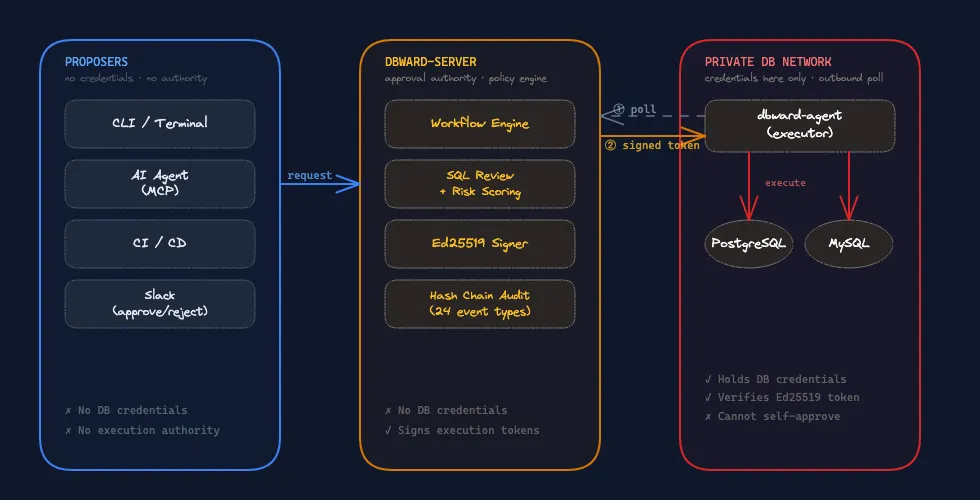
| Component | DB credentials | Approval authority | Accepts inbound traffic |
|---|---|---|---|
| CLI / AI agent | ✗ | ✗ | ✗ |
| Server | ✗ | ✓ | ✓ |
| Agent (executor) | ✓ | ✗ | ✗ (outbound poll only) |
The server — the most likely compromise target — holds no credentials and cannot reach any database. The agent holds credentials but only executes operations carrying a valid Ed25519 signature. The AI proposes but can neither approve nor execute.
How it works: credential isolation → approval → execution → audit
Credential isolation
No single component can both decide and execute. The server signs approval tokens. The agent verifies signatures and executes. The CLI/AI holds neither credentials nor authority. Compromise any one component and you still can’t unilaterally modify production data.
Evaluable approval
When a request enters the workflow, dbward collects context in the background:
$ dbward request show req_a1b2c3
SQL:     DELETE FROM orders WHERE created_at < '2025-01-01'Reason:  retention policy cleanupRisk:    Medium [LargeTable { rows: 101003 }]
Explain: ModifyTable on orders (rows=0, cost=1797)           Seq Scan on orders (rows=43633, cost=1797)           Filter: (created_at < '2025-01-01'::timestamp)
Tables:  orders
Risk assessment, table metadata, and sql review are computed at request creation. EXPLAIN is collected best-effort by the agent — if the target database is unreachable or the query can’t be explained, the request still proceeds (the approver sees “unavailable” instead of a plan). The goal is to provide context when possible, not to block on it.
Policy engine (fail-closed)
Workflows are defined in TOML. No matching rule → rejected. Misconfiguration fails safe.
# Development: auto-approve everything[[workflows]]database = "*"environment = "development"
[workflows.auto_approve]mode = "always"
# Production: risk-based auto-approve + two-step approval[[workflows]]database = "*"environment = "production"require_reason = true
[workflows.auto_approve]mode = "risk_based"risk = "low"max_estimated_rows = 1000
# Step 1: team lead reviews[[workflows.steps]]
[[workflows.steps.approvers]]role = "team-lead"min = 1
# Step 2: DBA approves (after step 1)[[workflows.steps]]
[[workflows.steps.approvers]]role = "dba"min = 1
Steps execute in sequence — step 2 only becomes active after step 1 is satisfied. Each step can list multiple approver groups: by default all must approve (AND), or set mode = "any" so that one is sufficient (OR).
Auto-approve is configured per workflow: mode = "always" skips approval unconditionally, mode = "risk_based" skips only when risk is at or below the threshold. If risk exceeds the threshold, the request falls through to the workflow’s approval steps.
SQL review blocks dangerous patterns before they reach approval, scoped per database and environment:
[[sql_review]]database = "*"environment = "production"no_where_delete = "block"no_where_update = "block"drop_table = "block"
[[sql_review]]database = "*"environment = "development"drop_table = "warn"
Break-glass for emergencies — executes immediately but records everything in the audit chain and notifies configured channels (Slack alert, webhook):
$ dbward execute "SELECT pg_terminate_backend(pid) FROM ..." \ --environment production --emergency \ --reason "connection pool exhausted, incident #1234"Execution guards
Approval is the gate. Execution policies are the guardrails after the gate opens:
- Statement timeout: queries are killed if they exceed the configured limit (e.g. 30s for production). Even an approved query doesn’t run forever.
- Rate limiting: max N executions per window per scope — prevents an AI agent from hammering the same mutation in a loop.
- Result storage: query results are persisted (local filesystem or S3) with configurable retention and access controls — auditors can verify what was returned, not just what was run.
If the agent crashes mid-execution or loses its lease, the server detects the orphan via heartbeat timeout and marks the request as lost. Pending requests expire after a configurable TTL. Nothing hangs indefinitely.
Tamper-evident audit
Every operation is recorded in a hash chain. Each event includes the SHA-256 hash of the previous event. Deletion, modification, or insertion breaks the chain.
$ dbward audit --verify✓ Hash chain intact (1,847 events verified)$ dbward audit --limit 5
ID TIMESTAMP USER EVENT ENV DATABASE OUTCOME96af1a07 2026-06-25T14:23:10 agent execution.completed production app successd3e4f5a6 2026-06-25T14:23:09 agent execution.started production app successc646583f 2026-06-25T14:22:58 admin request.approved production app success7b2c91e4 2026-06-25T14:22:55 system request.created production app successa1f8d302 2026-06-25T14:20:11 developer auth.failure — — deniedEach audit event records: who (actor + IP + identity source), what (operation, SQL fingerprint, target database), when, why (reason), and the outcome. Events cover execution, approval, authentication, token lifecycle, policy changes, and agent status — designed to satisfy SOC 2 Type II and ISO 27001 evidence requirements.
SQL in audit entries is redacted by default (literals replaced with ?) to prevent credential leakage in logs. Events can also be pushed in real-time via Slack notifications or generic webhooks — for alerting, SIEM integration, or custom dashboards.
The agent verifies an Ed25519 signed token before every execution — binding the approval to a specific request, SQL hash, environment, expiration, and requester identity. Modify the SQL after approval, replay the token for a different user, or let it expire — the agent refuses.
MCP-native: same tool call, structural checkpoint
dbward is an MCP server. AI agents call it like any other tool — but when approval is needed, the call returns a pending status instead of a result:
AI: dbward_execute_query    sql: "DELETE FROM orders WHERE created_at < '2025-01-01'"    environment: production    reason: "retention policy cleanup"
→ "Request created. Status: pending. Awaiting approval (req_a1b2c3)"
The AI then calls dbward_wait_request to poll for the result after approval. When approval isn’t needed (auto-approved or development environment), dbward_execute_query returns the result directly — no second call required.
From the CLI, the same flow:
$ dbward execute "DELETE FROM orders WHERE created_at < '2025-01-01'" \    --environment production --reason "retention policy cleanup"
Request req_a1b2c3 requires approval.  Approvers: role:adminRun: dbward request resume req_a1b2c3 after approval.
From CI/CD, same engine:
$ dbward migrate up --environment production# exit 2 = pending approval# exit 0 = executedOne protocol, one policy engine, one audit trail — regardless of who or what initiated the request. dbward supports both local MCP (stdio, for IDE integration) and remote MCP (Streamable HTTP, for shared server deployments).
Don’t ban AI from databases. Build the boundary.
The answer isn’t “AI shouldn’t touch databases.” AI-generated SQL is already better than most hand-written SQL for routine operations. The answer is: don’t let anything — human or AI — execute against production without a structural checkpoint.
dbward doesn’t make SQL safer. It makes the path from SQL to execution auditable, approvable, and fail-closed by default.
“AI agent with a connection string” is today’s expedient default. It should not become tomorrow’s standard architecture. The boundary exists. Use it.
All of this is free
Everything described in this article — approval workflows, hash chain audit, MCP server, break-glass, CLI, risk scoring, SQL review, execution guards — ships under Apache-2.0. No feature gates, no “upgrade to unlock approvals.”
The commercial license covers team-scale features: OIDC/SSO, group-based authorization, and higher database/user limits. The security boundary itself is never paywalled.
What dbward doesn’t do
- SQL correctness: surfaces risk, but a human can still approve a bad query.
- Replace DB permissions: use least-privilege roles. dbward is an application-layer boundary, not a substitute for
GRANT. - Approval fatigue: auto-approve rules exist for a reason. Tune thresholds to match your team’s risk tolerance.
Get started
The Docker quickstart walks through the full flow — submit, approve, execute, audit — in under 2 minutes with a single docker compose up.
→ GitHub · Docs · Quickstart