DB approval systems die at the network boundary
You’ve evaluated a centralized DB approval tool. The POC works in dev. Everyone agrees it solves a real problem — audit, approval workflows, credential management. Then someone asks:
“How does the server reach production databases?”
That question stalls deployments for weeks. Here’s what the answer looks like in practice:
Cross-VPC (same account): PrivateLink + Network Load Balancer + RDS Proxy. Three Terraform resources, each requiring security review. Security groups on both sides. Route table updates.
Cross-account: All of the above, plus VPC endpoint services, RAM resource shares, IAM trust policies, and a DNS resolution chain.
On-prem ↔ cloud: VPN tunnel or Direct Connect. Firewall exception requests. Change advisory board review. Dark Reading reports that security teams can take weeks to approve firewall exceptions. AWS’s prescriptive guidance documents a multi-step review process for port changes alone.
The result: a tool that took 2 days to evaluate takes 2 months to reach production. Or teams give up and build a bastion host — inheriting SSH key management, OS patching, access auditing, and scaling problems.
This isn’t a process failure. It’s a structural mismatch: databases are placed in the most restricted network segment by design. Any architecture that requires a control plane to reach into that segment turns network boundary management into the primary adoption cost.
dbward’s model: client requests, server decides, agent executes
dbward splits database access into three components with non-overlapping capabilities:
| Component | Holds DB credentials | Makes approval decisions | Reaches databases |
|---|---|---|---|
| CLI / AI agent / CI | ✗ | ✗ | ✗ |
| Server | ✗ | ✓ | ✗ |
| Agent | ✓ | ✗ | ✓ |
The key insight: the server never touches a database. It evaluates policies, records audit events, and signs execution tokens. It can run anywhere — cloud, SaaS, a container in your management VPC. It doesn’t need database connectivity.
The agent is the only component that connects to databases. It sits inside the same network segment where the database lives. It needs no inbound ports — all communication flows outward to the server over HTTPS.
The agent lives where the database lives
Each network boundary gets its own agent (deployment guide · configuration reference):
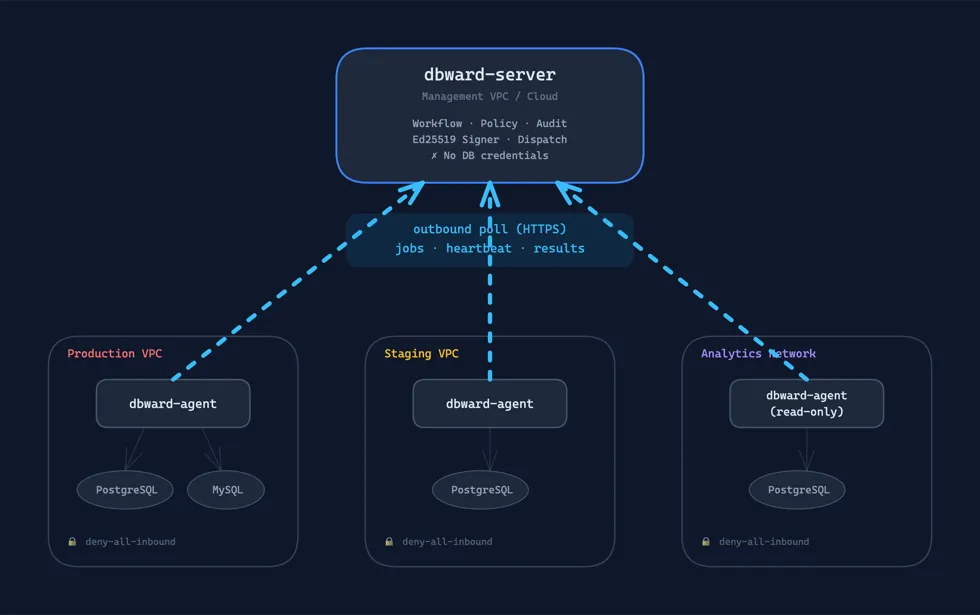
DB credentials never leave their network segment. The server never needs to route to any database. Each agent’s security group is deny-all-inbound — there is nothing to attack from outside.
Outbound polling: no inbound ports, no firewall tickets
The agent initiates all communication. Every second, it sends an HTTP POST to the server:
{ "capabilities": { "databases": ["app", "analytics"], "environments": ["production"], "operations": ["execute_select", "execute_dml", "migrate_up", "migrate_down"] }, "limit": 2, "status": { "in_flight": 0, "max_concurrent": 4, "draining": false, "uptime_secs": 86402 }}The server responds with dispatched jobs (if any). No push. No WebSocket. No callback URL.
Why polling (not push)?
- NAT traversal: outbound HTTP(S) works through any NAT, corporate proxy, or firewall without configuration
- Firewall simplicity: only outbound egress required (typically port 443). No inbound rules to maintain, rotate, or audit
- Backpressure built-in: agent reports available capacity; server never over-dispatches
- Disconnection resilience: if the server is down, the agent retries next tick — no persistent connection to manage
- No network coordination: no PrivateLink, no VPN, no firewall tickets
The trade-off: ~1 second latency between dispatch and execution start. For database operations that require approval workflows, this is invisible.
Capability matching: routing jobs to the right agent
Not all agents are equal. The server matches jobs to agents based on three dimensions:
| Dimension | Example values | Effect |
|---|---|---|
databases | ["app", "billing"] | Agent receives jobs for these DBs |
environments | ["production"] | Agent receives jobs for these environments |
operations | ["execute_select"] | Agent only receives read operations |
This enables purpose-built agents:
- Production-only agent:
databases=["*"], environments=["production"], operations=["execute_select", "execute_dml"] - Migration agent:
databases=["*"], environments=["*"], operations=["migrate_up", "migrate_down"] - Read-only analytics agent:
databases=["analytics"], environments=["production"], operations=["execute_select"] - Customer-specific agent:
databases=["customer_abc"], environments=["production"]
When multiple agents can handle a job, the first to claim it wins (see next section). The server caps dispatch at 20 jobs per poll response and respects each agent’s reported available capacity.
Claim, lease, and heartbeat: safe distributed execution
Database operations are not idempotent. Running the same DELETE twice is catastrophic. dbward uses a claim/lease/heartbeat protocol to prevent concurrent execution of the same job. Under agent crash or network partition, it fails closed — marking the execution as lost and allowing controlled re-dispatch or late-completion reconciliation.
Claim: exclusive lock acquisition
When an agent receives a dispatched job, it calls the claim endpoint. This is an atomic transaction:
- Verify the request is still in
dispatchedstatus (optimistic CAS:UPDATE ... WHERE status = 'dispatched') - Create an execution record
- Transition request to
running - Record audit event
If two agents race to claim the same job, exactly one succeeds (affected_rows > 0). The other receives HTTP 409 and moves on. No double-execution. No distributed locks. Just a database CAS.
For migrations, an additional check prevents concurrent DDL: no two migrations can run simultaneously against the same database/environment.
Lease: bounded execution time
Each claimed job gets a lease — a deadline by which execution must complete or be renewed:
| Operation | Lease duration |
|---|---|
| Standard query (30s timeout) | 60 seconds |
| Long query (300s timeout) | 330 seconds |
| Migration | 600 seconds (configurable) |
Formula: statement_timeout + 30s buffer, minimum 60 seconds. Migrations get a dedicated migration_lease_duration_secs config.
Heartbeat: lease renewal + cancellation channel
Every 2 seconds during execution, the agent heartbeats the server. Each heartbeat extends the lease by its full duration — so a running query never expires as long as the agent is alive.
The heartbeat response carries a cancelled flag. When the server needs to abort an execution (user-initiated cancel, admin override), it sets this flag. The agent:
- Sets a local cancel flag
- Waits 2 seconds (grace period for in-flight transactions to complete)
- Issues
pg_cancel_backend(PostgreSQL) orKILL QUERY(MySQL) to cancel the running statement - For migrations: skips active cancellation entirely — DDL mid-execution could corrupt schema. Enforcement depends on your configured
migration_statement_timeout_secs; by default this is unlimited unless explicitly set.
Execution lost: detecting agent death
A background job on the server runs every 60 seconds, checking for executions whose lease has expired:
SELECT id, request_id FROM executionsWHERE status IN ('claimed', 'running')AND lease_expires_at < now()Expired executions are marked failed, the request transitions to execution_lost, and a webhook fires. The request can then be re-dispatched via resume — either manually or by a waiting CLI/MCP client.
Worst-case detection delay: lease duration + 60 seconds. For a standard query with a 60-second lease, an agent crash is detected within ~120 seconds.
The agent as data collector: schema sync, EXPLAIN, risk scoring
The agent does more than execute. It feeds contextual data back to the server to power approval decisions:
Schema sync
On startup (and optionally on an interval), the agent collects the database schema:
- Table names, schemas, estimated row counts (from
pg_class.reltuples) - Columns: names, types, nullability, defaults, primary keys
- Constraints: foreign keys with
ON DELETEaction (CASCADE, SET NULL, RESTRICT…) - Indexes: columns, uniqueness, type
This snapshot is sent to the server and stored per database/environment. After every successful migration, the agent attempts a re-sync automatically — though this is best-effort and may fail silently, leaving the server with a stale view until the next scheduled sync.
Schema data is accessible through the API (GET /api/schemas/{db}) and MCP (dbward_inspect_schema tool), scoped by the caller’s role — a user with access only to development won’t see production schemas. AI agents use this to generate more accurate SQL: they can reference exact column names, types, and foreign key relationships before writing a query — significantly reducing hallucinated column names or invalid joins.
How the server uses schema data
When a request is created, the server:
- Parses the SQL to identify affected tables
- Looks up those tables in the stored schema: row counts, foreign keys, cascade actions
- Passes this to the risk scorer along with EXPLAIN output and sql_review results
- Computes a risk level:
| Condition | Risk |
|---|---|
SELECT with allow_read_only | Low |
| Safe DDL (CREATE INDEX, CREATE TABLE) | Low |
Large table (rows > max_estimated_rows) | Medium |
| CASCADE FK + small table | Medium |
| CASCADE FK + large table | High |
| DROP TABLE / TRUNCATE | High |
| Multi-statement DML | High |
| Schema not synced | Unknown |
This risk level drives auto-approve decisions: a workflow configured with risk = "low" will auto-approve Low-risk requests and route everything else to human approval.
EXPLAIN collection
When a workflow has explain enabled, dbward creates a best-effort dry-run EXPLAIN job for query/DML requests. The agent executes it opportunistically with a short timeout (5 seconds). If the database is unreachable, the query can’t be explained, or the timeout fires — the request proceeds without it. The approver sees “unavailable” instead of a plan. Approval is never blocked on EXPLAIN availability.
Approval and execution are separate events
Most tools execute immediately on approval. dbward separates these:
create (Pending) → approve (Approved) → resume (Dispatched) → agent claims → executeThe resume step is explicit. After approval, the request sits in Approved status until someone triggers execution. This matters because:
- Timing control: approve during business hours, execute during maintenance window
- Approval TTL: approvals expire after a configurable time (
approval_ttl_secs). Approve today, forget to execute, it expires safely. - Retry: if execution fails or the agent crashes (
execution_lost), the request can be re-dispatched without re-approval.
For auto-approved requests (Low risk in development, break-glass), create and dispatch happen atomically — no resume needed.
For MCP (AI agent) integration, wait_request handles this transparently: it auto-resumes approved requests and polls for completion. The AI’s workflow doesn’t change.
Degraded mode and operational resilience
Database connection failure
If a database pool fails 2+ consecutive times, the agent enters degraded mode:
- Removes its readiness probe (
/tmp/dbward-agent-ready) - Stops accepting all new work until recovery
- Attempts reconnection each poll cycle
- Automatically recovers when connections succeed
This is conservative by design: a connectivity failure often signals a network-level issue affecting multiple pools.
Server unreachable
If the server goes down:
- In-flight jobs continue executing (they already have signed tokens)
- No new jobs are dispatched (no poll response = no new work)
- After 6 consecutive poll failures, readiness probe removed
- Automatic recovery on server return
Startup resilience
The agent retries with exponential backoff during startup:
- Public key fetch (from server)
- Database connections
- Initial poll (token validation)
If startup exceeds a configurable deadline (startup_max_wait_secs), the agent exits rather than running in an undefined state.
Graceful drain
On SIGTERM/SIGINT:
- Stop accepting new jobs
- Notify server with
draining: true - Wait for in-flight jobs (configurable timeout, default 60s)
- Remove readiness probe
- Exit (error if timeout exceeded — in-flight executions may be interrupted)
For Kubernetes: set terminationGracePeriodSeconds ≥ drain_timeout_secs. Rolling updates are safe as long as queries complete within the drain window.
Summary: centralized control, distributed execution
| Concern | Where it lives |
|---|---|
| Policy evaluation | Server (cloud/management VPC) |
| Approval workflow | Server |
| Audit log (hash chain) | Server |
| Ed25519 token signing | Server (filesystem key) |
| Risk scoring + schema | Server (using agent-provided data) |
| DB credentials | Agent (never leaves the DB network) |
| SQL execution | Agent |
| EXPLAIN / schema collection | Agent |
| Network exposure | Agent: outbound-only. Server: standard HTTPS |
The server is the brain — it decides what’s allowed. The agent is the hands — it executes what’s been signed. Neither trusts the other blindly: the server dispatches only to capable agents, and the agent verifies every token cryptographically before executing.
This means:
- No network coordination: agent binary + config file +
deny-all-inboundsecurity group. No firewall tickets. - Credentials stay local: DB passwords never traverse the network to a central server.
- Fail-closed: no signed token = no execution. Agent crash = execution_lost + webhook. Server crash = no new dispatches (in-flight completes).
- Scale horizontally: add agents per network boundary. The server handles routing.
Get started
The Docker quickstart deploys server + agent + database in a single docker compose up. Watch the full flow: submit → approve → resume → agent claims → executes → result.
→ GitHub · Docs · Agent deployment guide · Configuration reference · First article: AI agents should not have direct production DB credentials